滑鼠越輕越好?打 FPS 必看的「握法」與「重量」迷思
一句話說明:滑鼠不是越輕越好:低靈敏度、用手臂大範圍移動的玩家適合輕量化;高靈敏度、靠手腕微調的玩家,70–90g 左右的重量反而更穩。形狀是否貼合你的握法(趴握、抓握、指握),比少 10 克更重要。
跟風買了現在最紅的 50g 超輕量化打洞滑鼠,結果在打《戰地風雲 2042》這種需要大範圍找人、頻繁跟槍的遊戲時,準心反而一直飄、對不到槍?
別急著怪滑鼠爛,也別懷疑自己的天分。問題可能出在你的「握法」跟這把滑鼠的「重量」根本八字不合。
Is Lighter Always Better? Mouse Weight & Grip Styles Explained
In one sentence: Lighter is not always better: low-sensitivity arm aimers benefit from ultralight mice, while high-sensitivity wrist aimers are often steadier at around 70–90 g. A shape that fits your grip (palm, claw or fingertip) matters more than shaving off 10 g.
So, you bought the latest 50g ultra-lightweight honeycomb mouse, but when you play fast-paced shooters like Battlefield 2042, your crosshair is shaking and you can't track targets?
Don't blame the mouse, and don't doubt your skills just yet. The issue might be that your "Grip Style" and the mouse's "Weight" are completely mismatched.
1. 你是哪一派?趴握、抓握、還是指握?
每個人的手掌大小不同,拿滑鼠的方式也決定了你適合哪種形狀:
- 趴握 (Palm Grip): 整隻手掌服服貼貼地趴在滑鼠上。這最舒服、最不累,適合玩節奏慢的遊戲或長時間辦公。你需要的是背部較高、不對稱的「人體工學鼠」。
- 抓握 (Claw Grip): 手掌根部靠著滑鼠尾巴,手指像老鷹抓獵物一樣立起來按按鍵。這是最主流的電競握法,點擊速度快,適合對稱型滑鼠。
- 指握 (Fingertip Grip): 手掌完全懸空,只有指尖碰到滑鼠。這種握法最靈活,但手指超容易酸,通常只有重度硬核玩家會用。
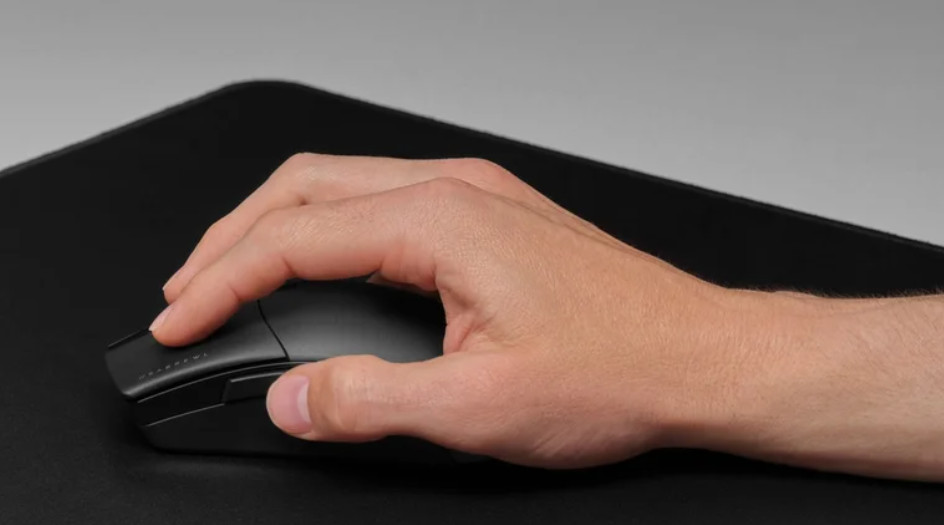
2. 為什麼輕量化不一定適合你?
現在的廠商都在瘋狂軍備競賽,恨不得把滑鼠減重到 40g。但越輕真的越好嗎?這取決於你的「靈敏度 (DPI)」設定。
如果你是低靈敏度的「手臂流」玩家,鼠墊超大一張,轉身要揮動整條手臂,那輕量化滑鼠絕對是神物,能拯救你的肩膀。
但如果你是高靈敏度的「手腕流」玩家,滑鼠只要移動一公分,遊戲裡就轉了 180 度。這時候滑鼠如果太輕,你緊張時手稍微抖一下,準心就飛到外太空了。適當的重量(大約 70-90g)反而能給你一種「煞車」的穩定感。
3. 怎麼挑尺寸?先量手,再看滑鼠
形狀合不合手,和尺寸有很大關係。可以先量兩個數字:手長(手腕第一條橫紋到中指指尖)和手寬(握拳時四指根部的寬度)。
社群常用的經驗值是:手長大約 17 cm 以下偏小、17–19 cm 為中等、19 cm 以上偏大,滑鼠長度大約是手長的六成上下比較好掌握。這只是玩家之間流傳的粗略參考,不是標準。不同握法的差異更大:趴握需要比較長的滑鼠,指握則偏好小而短的。
- 太小:手指會縮著,容易痠,長時間打下來手腕會用力。
- 太大:指尖按不到邊緣的按鍵,抓握時手指會被迫拉長。
- 寬度:側鍵與握感密切相關,滑鼠太寬會讓小指與無名指沒地方放。
4. 重量以外:靈敏度(eDPI)與鼠墊也在影響準度
換了滑鼠之後覺得「準心飄」,除了重量,有可能是靈敏度的設定。比較不同設定時,常用的指標是 eDPI = 滑鼠 DPI × 遊戲內靈敏度,還有「轉一圈 360° 需要移動幾公分」。
以 CS2 為例(每一個滑鼠計數轉 0.022 度):DPI 800、遊戲靈敏度 1.0,eDPI 為 800,轉 360° 大約要移動 52 公分。這是計算出的範例,每款遊戲的轉換係數不同,需要的鼠墊大小也隨之改變。
一般而言,CS2 玩家常見的 eDPI 落在 600–1,200 之間,這只是社群中常見的範圍,並不是「正確答案」。如果換了更輕的滑鼠,建議先維持原本的 eDPI,用一到兩週適應後,再決定要不要調整。
5. 感應器、腳貼與鼠墊:你以為是重量,其實是摩擦
- 腳貼(滑鼠底部的塑料):材質與面積決定起步和停止時的阻力,新腳貼較滑,用久了會磨損,手感也會改變。
- 鼠墊表面:「速度型」鼠墊摩擦低,滑動快;「控制型」摩擦高,容易停下來。同一支滑鼠換不同鼠墊,手感差異有時比換滑鼠還大。
- 線材或無線:有線滑鼠的線會增加拖曳感,所以輕量有線滑鼠通常配軟線;無線則沒有這個問題,可參考我們的無線滑鼠延遲文章。
- 重心位置:同樣 60g,重心偏前或偏後,手感也不同,這是規格表上看不到的資訊。
6. 換滑鼠的實測方法:給自己公平的比較
很多人換新滑鼠之後,只打幾場遊戲就下結論,其實肌肉記憶要幾天才能適應。建議用比較有系統的方式:
- 固定測試環境:同一個遊戲、同一個靈敏度、同一張鼠墊,一次只改一個變數。
- 用 3D 練槍工具做相同設定的訓練,觀察命中率與反應時間的變化,而不是只憑感覺。
- 先確認感應器穩定:到 滑鼠回報率測試看回報率有沒有掉。
- 給自己至少一到兩週的適應期,再決定是否退貨或繼續用。
也要記得,握法不是一成不變,很多人會混合使用。如果操作時手腕或手指感到持續疼痛,請停下來休息,必要時諮詢醫療專業人員,不要用「忍耐」換取成績。
💡 老玩家的心聲
盲目追求輕量化是沒意義的。找一把形狀能完美貼合你手掌的滑鼠,遠比那少掉的 10 克重量來得重要。
1. What's Your Style? Palm, Claw, or Fingertip?
Everyone's hands are different, and how you hold the mouse dictates what shape you should buy:
- Palm Grip: Your entire hand rests flat on the mouse. It's the most comfortable and least fatiguing. Perfect for slow games or office work. You need a taller, asymmetrical "Ergonomic" mouse.
- Claw Grip: The base of your palm rests on the back, and your fingers arch like an eagle's claws. This is the standard gamer grip. Fast clicking, great for symmetrical mice.
- Fingertip Grip: Palm hovers completely; only fingertips touch the mouse. Maximum agility, but extreme finger fatigue. Usually for hardcore aimers only.
2. Why Ultra-Light Isn't for Everyone
Brands are in a crazy race to make 40g mice. But is lighter really better? It depends entirely on your Sensitivity (DPI).
If you are a Low-Sens "Arm Aimer" with a massive mousepad, sweeping your whole arm to turn around, an ultra-light mouse is a godsend. It saves your shoulder.
But if you are a High-Sens "Wrist Aimer", where moving one inch spins you 180 degrees, a mouse that is too light will pick up every nervous twitch in your hand. Your crosshair will fly off target. A bit of weight (around 70-90g) provides necessary friction and stopping power.
3. Picking a Size: Measure Your Hand First
Whether a shape fits depends heavily on size. Start with two measurements: hand length (the first wrist crease to the tip of your middle finger) and hand width (across the knuckles with a loose fist).
A rule of thumb in the community: under about 17 cm is small, 17–19 cm is medium, over 19 cm is large, and a mouse about 60% of your hand length is easy to control. It is a rough reference passed around among players, not a standard. Grip style changes it more: palm grip wants a longer mouse, fingertip grip prefers a small, short one.
- Too small: Your fingers curl up, get tired, and your wrist ends up doing extra work.
- Too large: Your fingertips cannot reach the edge buttons, and claw grip forces the fingers to stretch.
- Width: It affects side-button reach too. A very wide mouse leaves no room for the ring and little fingers.
4. Beyond Weight: Sensitivity (eDPI) and the Mousepad Matter
If a new mouse makes your crosshair feel floaty, weight is not the only suspect. Your sensitivity setup might have changed. The common yardsticks are eDPI = mouse DPI × in-game sensitivity and "how many centimeters you move for a 360° turn."
Take CS2 (0.022 degrees per mouse count): at 800 DPI and 1.0 in-game sensitivity, eDPI is 800 and a 360° turn takes about 52 cm of movement. This is a calculated example. The conversion factor differs between games, and so does the mousepad size you need.
CS2 players commonly sit between about 600 and 1,200 eDPI, but that is only a common range in the community, not a correct answer. After switching to a lighter mouse, keep your old eDPI, adapt for a week or two, and only then decide whether to change it.
5. Sensor, Skates and Pad: It Feels Like Weight but It's Friction
- Mouse feet (skates): Material and surface area set the resistance when you start and stop moving. New skates are slick and wear down, and the feel changes with them.
- Pad surface: "Speed" pads have low friction and glide fast. "Control" pads have higher friction and stop easily. Swapping the pad can change the feel more than swapping the mouse.
- Cable or wireless: A cable adds drag, so light wired mice usually ship with soft cords. Wireless avoids that. See our wireless mouse latency article.
- Balance: Two 60 g mice can feel different if one is front-heavy and the other rear-heavy. The spec sheet will not tell you that.
6. A Fair Way to Test a New Mouse
Many players judge a new mouse after a few matches, but muscle memory needs days to adjust. A more systematic approach:
- Fix the environment: same game, same sensitivity, same pad, and change one variable at a time.
- Run the same drills in the 3D aim trainer and watch hit rate and reaction time over time instead of going by feel.
- Confirm the sensor is stable with the polling rate test.
- Give yourself at least one or two weeks before deciding to return it or keep it.
Grip is not fixed, and many players mix styles. If your wrist or fingers hurt persistently while playing, stop and rest, and see a medical professional if needed. Do not trade pain for rank.
💡 Veteran Advice
Stop chasing the lightest numbers. Finding a shape that perfectly supports your grip is vastly more important than shaving off 10 grams.
Is your sensor stable?
Heavy or light, a stable polling rate is what truly matters. Test your mouse's performance now.
Test Mouse Stability 🎯 Try your grip in the 3D aim trainer