鍵盤用久了又油又滑?PBT 與 ABS 鍵帽材質到底差在哪
一句話說明:鍵帽「打油」發亮的主因是 ABS 材質硬度低、表面紋路容易被磨平;PBT 較硬、耐磨,幾乎不會打油,但價格較高、透光字效果較差。換一套 PBT 鍵帽,是讓舊鍵盤手感煥然一新最便宜的方法。
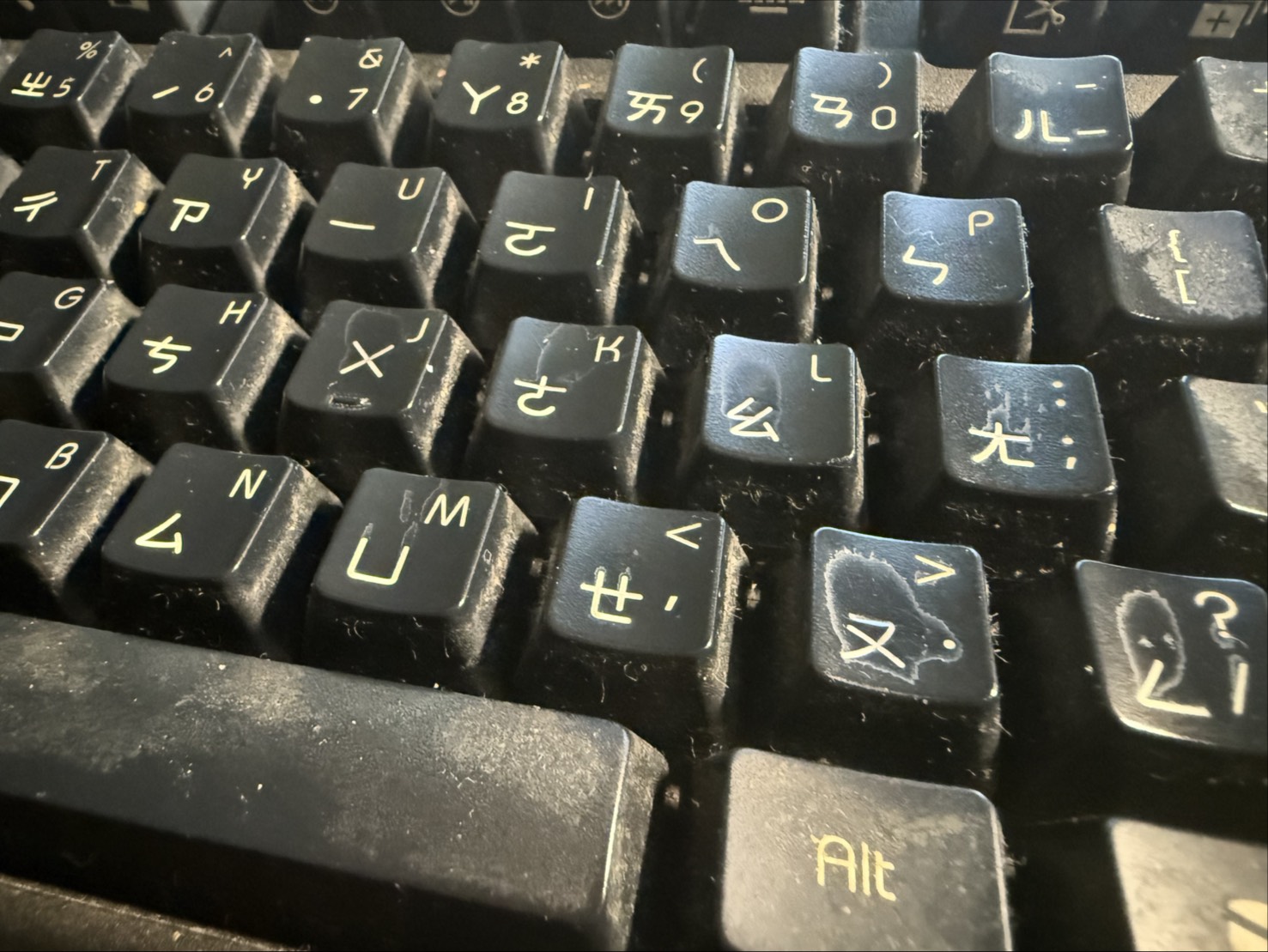
滿心歡喜買了一把超帥的 RGB 機械鍵盤,結果每天高強度打了幾個禮拜的遊戲後,發現最常用的 W、A、S、D 鍵變得油光煥發,手放上去還會滑掉,像剛吃完炸雞沒洗手一樣?
這在鍵盤圈被稱為「打油」。罪魁禍首通常不是你的手汗,而是鍵帽的「材質」。
Shiny and Slippery Keys? PBT vs. ABS Keycaps Explained
In one sentence: Keys go shiny mainly because ABS plastic is soft and its texture wears smooth. PBT is harder and hardly shines, though it costs more and backlit legends are less crisp. A PBT keycap set is the cheapest way to make an old keyboard feel new.
You bought a sick new RGB mechanical keyboard, but after a few weeks of intense gaming, the W, A, S, and D keys look incredibly shiny and feel greasy, like you've been eating fried chicken while playing?
In the keyboard community, this is called "Shine." And the culprit usually isn't your sweaty hands; it's the "material" of the keycaps.
1. ABS 鍵帽:原廠的最愛,打油的元兇
市面上 80% 的原廠鍵盤(即使是幾千塊的大廠牌)都配備 ABS 鍵帽。為什麼?因為它好加工。
- 優點: 顏色可以做得很鮮豔,RGB 透光效果極佳,剛買來的時候手感很細膩滑順。
- 缺點: 硬度很低。只要你的手指每天摩擦,不出一個月,表面的微小紋路就會被磨平,變成反光又滑溜溜的「打油」狀態。
2. PBT 鍵帽:硬派玩家的救贖
如果你受夠了黏膩的手感,請去買一套 PBT 鍵帽換上。這是一種硬度極高的塑料。
- 優點: 表面有一種像細沙一樣的「磨砂感」,非常乾爽。重點是:超級耐磨,幾乎永遠不會打油。
- 缺點: 加工困難,所以價格通常較貴。而且因為材質特性,如果要做成字體透光的款式,邊緣有時候會有一點不夠銳利。
3. 材質之外:製程決定字會不會掉
同樣是 PBT 或 ABS,字元的做法不同,耐用度和外觀也不一樣。購買前可以先看商品頁寫的是哪一種:
- 雙色射出:字元和鍵帽是兩種塑料一體成形,字不會磨掉,邊緣銳利,透光效果好。常見於中高價位鍵帽,ABS 與 PBT 都有。
- 染料昇華(Dye-Sub):用熱把染料滲進塑料表面,字元顏色有一定深度,耐磨度很好,常見於 PBT 鍵帽。缺點是字元邊緣比較柔,顏色選擇也較受限。
- 雷射雕刻:用雷射燒出字元,成本低、透光字常用,但字元表面有塗層,長期使用後塗層可能磨損。
- 印刷(移印/噴印):最便宜的做法,字最容易被手指磨掉,經常出現在入門鍵盤上。
4. 鍵帽輪廓(Profile):高度和弧度也影響手感
鍵帽的「輪廓」指的是每一列的高度與頂面弧度。同一套材質,輪廓不同,打起來的感覺就不同:
- OEM/Cherry:不同列有不同高度與傾斜角,是最常見的原廠與遊戲鍵盤輪廓,手感比較「標準」,大部分玩家不需要適應。
- DSA/XDA 等均高型:每一列高度相同,頂面較平,換位置不受限,但要適應較平的頂面。
- SA 等高輪廓:鍵帽比較高,聲音與手感偏獨特,在玩家圈很有風格,但對 FPS 的 WASD 操作來說,較高的鍵帽通常需要重新適應。
如果你主要打競技遊戲,換成和原廠高度接近的輪廓通常最不用重新適應;想追求外觀與打字手感,再考慮其他輪廓。這些描述是玩家社群的一般共識,主觀感受仍因人而異。
5. 買之前:相容性檢查清單
- 軸心規格:市面上大多數機械軸(Cherry MX 與相容軸)使用十字軸心,鍵帽通用。但 Alps、Topre 或部分薄型軸心不同,不能直接互換,請先確認自己的軸體。
- 鍵數與配列:確認鍵盤是 ANSI 還是 ISO,以及右 Shift、Enter、空白鍵等大鍵的尺寸,不同尺寸買錯會裝不上去。
- 底排尺寸:常見底排有 6.25U 與 7U 等不同空白鍵配置,購買前請對照自己的鍵盤。
- 透光需求:如果你用 RGB 背光,請選擇「透光字」或透明邊的款式,不透光的 PBT 鍵帽可能讓背光變暗。
- 拔鍵器:建議用金屬環型的拔鍵器,比夾式更不容易刮傷鍵帽或拔歪軸體。
6. 鍵帽打油了,還救得回來嗎?
先說清楚:打油的本質是表面紋路被磨平,並不是單純髒了,所以清潔只能去掉皮脂與汙垢,沒辦法恢復已經被磨平的質感。能做的是:
- 把鍵帽拔下來,用溫水加少量中性清潔劑浸泡,輕輕刷洗。
- 用清水沖乾淨,完全風乾後再裝回去,不要用高溫或吹風機直吹,塑料可能變形。
- 避免使用高濃度酒精或強溶劑擦拭印刷字或雷雕字,可能讓字元脫落。
如果只有 WASD、空白鍵等常用鍵打油,也可以只補買單顆或小套 PBT 鍵帽,不一定要整副更換。
另外要提醒:PBT 並不是「永遠不會」打油,只是磨損速度比 ABS 慢很多。如果你的手汗特別多、使用強度特別高,長時間下來 PBT 也會慢慢變亮,這是正常現象。
💡 換鍵帽就像換新鍵盤
老玩家都知道,別被原廠鍵帽綁死。花個幾百塊買一套好看的 PBT 鍵帽自己拔插換上,不但手感煥然一新,爽度完全不輸買一把新鍵盤。
1. ABS Keycaps: The Default Choice, The Shine Culprit
About 80% of pre-built keyboards (even expensive flagship models) come with ABS keycaps. Why? Because it's cheap and easy to mold.
- Pros: Vibrant colors, excellent RGB backlight transparency, and a smooth, refined feel right out of the box.
- Cons: Low hardness. With daily friction from your fingers, the micro-texture on the surface wears completely flat in under a month, creating that glossy, slippery "shine."
2. PBT Keycaps: The Hardcore Gamer's Salvation
If you're sick of the greasy feel, buy a set of PBT keycaps. It's a much harder, more durable plastic.
- Pros: It has a satisfying, dry, slightly "sandy" texture. The best part? It's incredibly wear-resistant and practically never shines.
- Cons: Harder to manufacture, making it more expensive. Also, getting perfect transparent shine-through lettering is difficult with this material.
3. Beyond Material: The Legend Process Decides Whether Letters Wear Off
Two PBT sets, or two ABS sets, can wear differently depending on how the legends are made. Check which method the product page lists:
- Double-shot: The legend and the keycap are molded from two plastics as one piece. The letters cannot wear off, the edges are crisp and shine-through is good. Common on mid to high-end sets, in both ABS and PBT.
- Dye-sublimation (dye-sub): Heat pushes dye into the plastic surface, so the legend has some depth and wears very well. Common on PBT. The edges are slightly softer and color choices are more limited.
- Laser etching: A laser burns the legend. It is cheap and common for shine-through legends, but there is a coating on the surface that can wear off over time.
- Printing (pad or spray): The cheapest method. Letters are the easiest to rub off, and you often see it on entry-level keyboards.
4. Keycap Profile: Height and Curvature Matter Too
A "profile" is the height and top curvature of each row. The same material in a different profile feels different:
- OEM / Cherry: Each row has its own height and tilt. This is the most common stock and gaming keyboard profile and feels "standard" to most players.
- DSA / XDA (uniform height): Every row is the same height with flatter tops. Keys can be swapped between positions freely, but the flat tops take getting used to.
- SA and other tall profiles: Taller caps with a distinctive sound and feel. Popular for style, but for WASD in FPS games, tall caps usually take some readjusting.
If you mostly play competitive games, a profile close to your stock height is the easiest switch. Consider others if looks and typing feel matter more. These descriptions reflect common community consensus, and personal feel still varies.
5. Before You Buy: A Compatibility Checklist
- Stem type: Most mechanical switches (Cherry MX and compatibles) use a cross-shaped stem, so keycaps are interchangeable. Alps, Topre and some low-profile switches use different stems, so confirm your switch type first.
- Layout and key sizes: Check whether your board is ANSI or ISO, and the sizes of the right Shift, Enter and space bar. A wrong size will not fit.
- Bottom row: Boards use different bottom-row layouts such as 6.25U or 7U space bars, so compare with your own keyboard.
- Backlight: With RGB, choose shine-through legends or clear-edged caps. Opaque PBT caps can dim the lighting.
- Keycap puller: A wire-ring puller is less likely to scratch caps or bend switches than the clip type.
6. Can a Shiny Keycap Be Saved?
To be clear: shine means the surface texture has been worn smooth, not just that it is dirty. Cleaning removes oil and grime but cannot restore texture that is already gone. What you can do:
- Pull the keycaps and soak them in warm water with a little mild detergent, then scrub gently.
- Rinse with clean water and let them dry fully before reinstalling. Avoid high heat or a hair dryer on close range, since plastic can warp.
- Avoid strong alcohol or solvents on printed or laser-etched legends, which may remove the letters.
If only WASD and the space bar are shiny, you can buy a small replacement set of PBT caps instead of replacing the whole board.
One more note: PBT does not "never" shine, it just wears much more slowly than ABS. If your hands sweat a lot or you play very intensively, PBT will slowly gloss over too, which is normal.
💡 Swapping Keycaps = A New Keyboard
Veterans know you don't have to stick with stock keycaps. Spending a few bucks on a fresh set of PBT keycaps can completely transform the feel and look of your board, making it feel brand new.
Check your keys after swapping!
Sometimes pulling off keycaps can accidentally loosen the mechanical switches underneath. Make sure to test every key.
Start Keyboard Test ⌨️ Feel different? Compare with the Typing Speed Challenge